This article explains how to fix the issue where NVDA only reads "Unknown" within Respondus LockDown Browser. It clarifies that this problem occurs when using the portable version of NVDA and provides step-by-step instructions to uninstall the portable version and install the full Desktop version of NVDA to ensure proper functionality with LockDown Browser.
Summary: NVDA reads "Unknown" within Respondus LockDown Browser when the portable version of NVDA is used; only the full Desktop version of NVDA is compatible with LockDown Browser.
Only the full Desktop version of NVDA should be installed and used with LockDown Browser.
To resolve the issue students should do the following:
1) Remove the portable version of NVDA
* Find the location of the folder the NVDA program was installed in
* Select all the files of the NVDA program, right-click, and select "Delete"
2) Install the Full Desktop version of NVDA
* Download the installer from here: https://www.nvaccess.org/download/
* Double-click the installer once it has downloaded
* Be sure to select the "Install NVDA on this computer" button and *not* the "Create portable copy" button
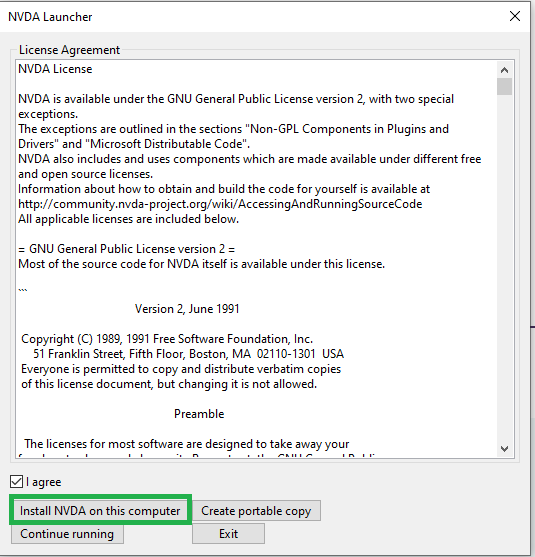
* Follow the prompts of the installer to complete the installation
* Open NVDA if it is not already running and launch LockDown Browser to see if the problem is resolved
Original source: NVDA Reads "Unknown" within Respondus LockDown Browser | Respondus-Source-ID: 4409607387291 | Source-Updated: 2022-04-08T19:24:10Z
Comments
0 comments
Please sign in to leave a comment.