If you are using a Mac trackpad and notice that the scrollbar does not appear during an exam, this article will help you fix the issue. By adjusting your Mac’s system preferences to always show scroll bars, you can ensure the scrollbar is visible when needed. Follow the steps to change the setting under System Preferences > General to resolve the problem.
Summary: Mac Trackpad users may experience the scrollbar not appearing during an exam, which can be resolved by changing the "Show scroll bars" setting to "Always" in the Mac System Preferences.
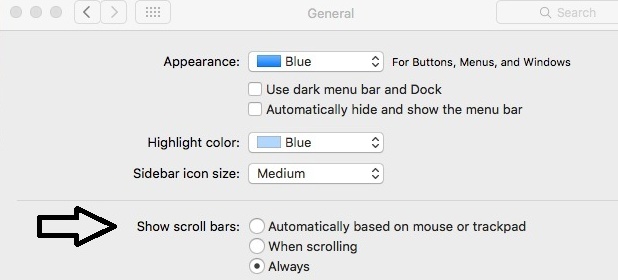
Mac Trackpad users may experience the scrollbar not appearing during an exam. To resolve the problem, on your Mac go to System Preferences > General. Change "Show scroll bars" to "Always" as shown below.
Original source: Missing Scrollbar on Mac | Respondus-Source-ID: 4409595551003 | Source-Updated: 2021-11-11T17:59:08Z
Comments
0 comments
Please sign in to leave a comment.