This article helps you resolve the "Bad Image" 0xc0000020 error when starting LockDown Browser, which is often caused by security software mistakenly identifying the browser as a threat. It provides recommended steps to uninstall and reinstall LockDown Browser properly and advises on managing your antivirus settings to ensure the browser runs without interference.
Summary: The "Bad Image" 0xc0000020 error when starting LockDown Browser is typically caused by security software mistakenly identifying the program as a threat, which can interfere with its startup and corrupt the installation.
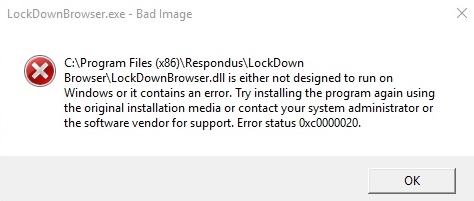
If you receive the above error when starting LockDown Browser, it's likely because of over aggressive security software wrongly determining that LockDown Browser is a threat. As a result, the startup of LockDown Browser is interfered with, and the installation of LockDown Browser may even be corrupted.
We recommend the following steps:
1) Uninstall LockDown Browser from your computer.
2) Reinstall LockDown Browser using a copy of the installer downloaded from your institution's unique LockDown Browser download URL.
3) Make sure you only have one major anti-virus security software program installed on your computer.
4) In the one anti-virus program (if any) be sure to permit "lockdownbrowser.exe" to run.
Original source: "Bad Image" 0xc0000020 when starting LockDown Browser | Respondus-Source-ID: 4409595632155 | Source-Updated: 2021-12-06T21:08:28Z
Comments
0 comments
Please sign in to leave a comment.